
Links
A card can link the work around it: pull requests, merge requests, issues and Jira tickets. desk asks each provider how they stand and shows it on the card, so you see what needs you without opening anything.
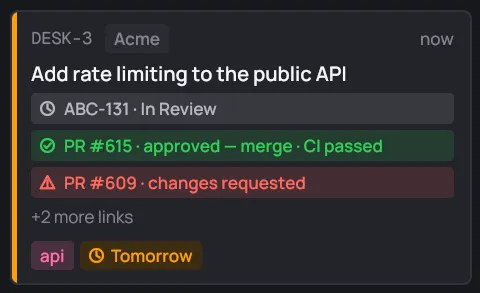
Add links
Section titled “Add links”- Type a URL or a ticket key in the new card dialog, or in its Links field.
- In the card’s editor (E), add it to the Links field, one per line. Delete a line to remove that link.
- Improve with Claude adds the tickets and pull requests it finds.
- The card’s session adds the ones it makes: when Claude opens a pull request, it attaches it to the card.
| Link | Shows as | Example |
|---|---|---|
| GitHub pull request | PR #n |
https://github.com/acme-corp/api/pull/615 |
| GitHub issue | #n |
https://github.com/acme-corp/api/issues/77 |
| GitHub commit | commit abc1234 |
https://github.com/acme-corp/api/commit/… |
| GitLab merge request | MR !n |
https://gitlab.example.com/acme/gateway/-/merge_requests/12 |
| GitLab commit | commit abc1234 |
https://gitlab.example.com/acme/gateway/-/commit/… |
| Bitbucket pull request | PR #n |
https://bitbucket.org/team/repo/pull-requests/4 |
| Jira issue | its key | https://acme.atlassian.net/browse/ABC-131 |
| A bare Jira key | its key | ABC-131 |
GitHub links are recognized on github.com, and on the host of any GitHub account
in the organization’s desk.toml. Jira links are recognized on *.atlassian.net and on your Jira accounts’ hosts.
A bare key like ABC-131 needs a Jira account to go with: one whose projects
list ABC, or the organization’s only Jira account. desk turns it into that
account’s /browse/ABC-131 URL.
Any other URL is kept as a plain link. desk doesn’t check it.
Live state
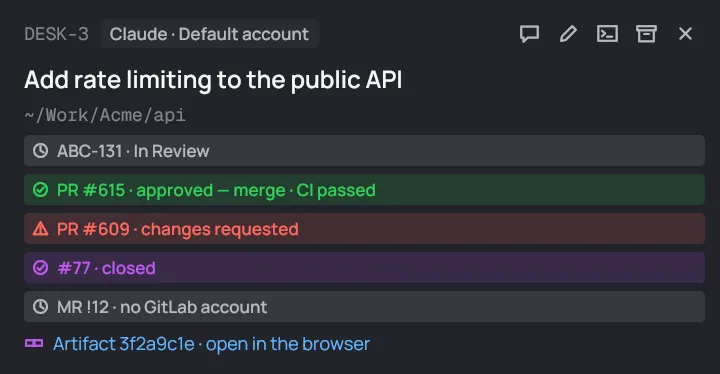
Section titled “Live state”Each link shows its state next to its reference, in a color that says how it’s going:
| Color | Means | For example |
|---|---|---|
| Green | good to go | approved — merge, CI passed |
| Gray | waiting | open, draft, waiting, a Jira status like In Review |
| Red | needs you | changes requested, closed (unmerged), CI failed, an error |
| Purple | done | merged, a closed issue, a Jira issue in a done status |
An open pull or merge request adds its CI: “approved — merge · CI failed”. A failed CI turns the chip red whatever the review says. Its runs are in the organization’s CI view.
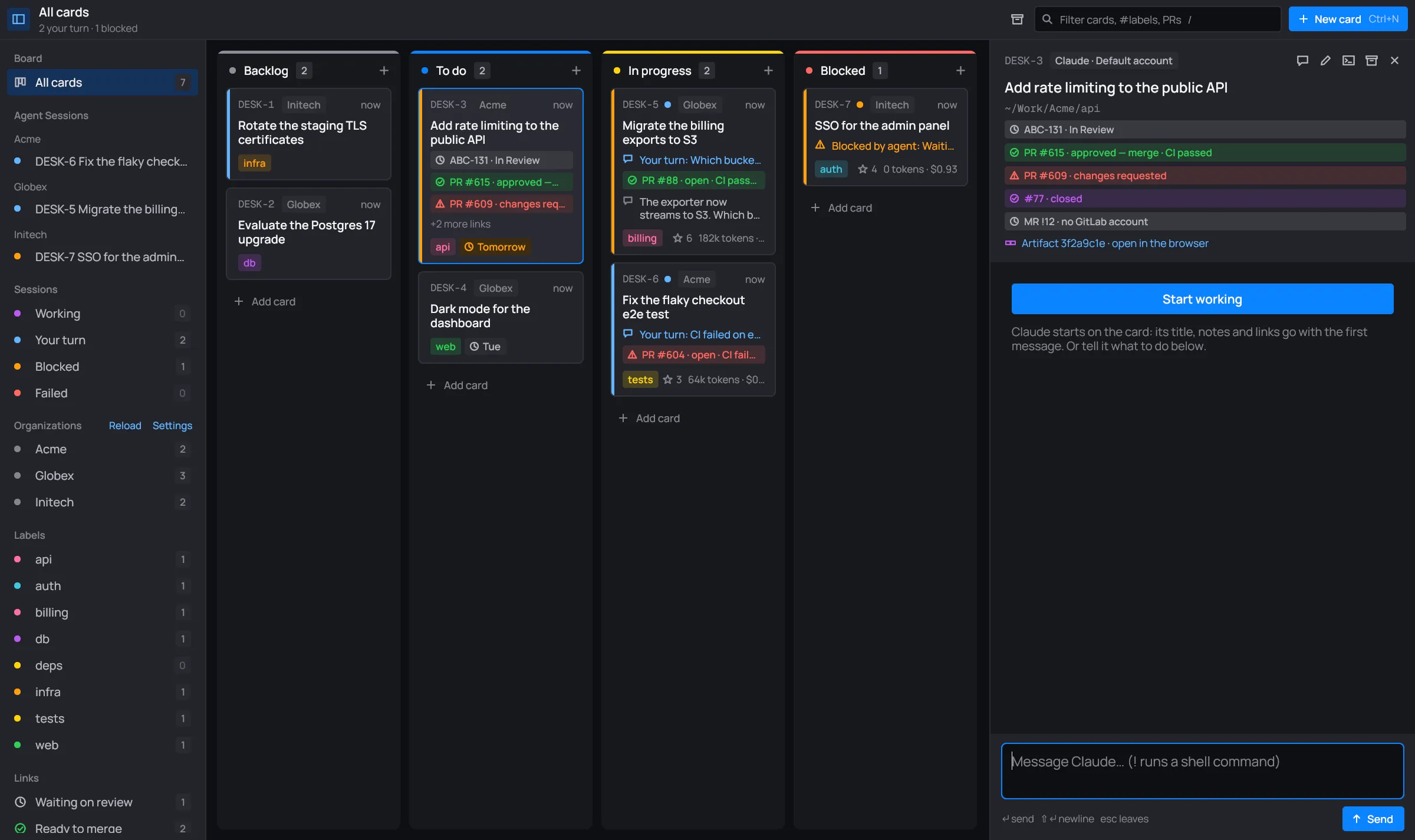
The sidebar’s Links views gather cards by these states: waiting on review, ready to merge, changes requested or CI failed, and open tickets.
When it’s refreshed
Section titled “When it’s refreshed”desk checks every link when it starts, then every 3 minutes. It also checks a card’s links right after you save the card. Reload, in the sidebar’s Organizations title, checks them all at once.
“no GitHub account”
Section titled ““no GitHub account””desk only asks a provider through one of the organization’s accounts. A link whose organization has no account (with a token) for its host and owner shows no GitHub account (or GitLab, Bitbucket) and is never fetched. Its CI stays out of the CI view too. Anonymous calls would see no private repositories, and run out fast.
Add the account in Settings, or by hand in desk.toml.
See Accounts.
Other states you may see:
- locked: unlock vault: the account’s token is in a password vault that’s still locked. The toolbar shows Unlock vault. See Vaults.
- ⚠ the error: the provider answered with an error, shown in red.
Tickets follow their card
Section titled “Tickets follow their card”When a card moves to another column, its Jira and GitHub issues move to match:
- A Jira issue takes the transition to the column’s status category. For Blocked,
that’s a status named Blocked, if the issue’s workflow has one. An account’s
statustable indesk.tomlcan name the status for each column instead. - A GitHub issue closes in Done, and reopens when the card leaves Done.
- Pull and merge requests are left alone.
A toast says where each one went (“ABC-131 → In Review”). When desk starts, and
every 3 minutes, it moves back any ticket that drifted from its card’s column.
An account with sync = false is left out. See desk.toml.
Artifacts
Section titled “Artifacts”When a card’s session publishes an artifact (a page Claude made), desk lists it under the card’s links in the session panel: Artifact id · open in the browser. Click it to open it.