
Concepts
Cards are sessions
Section titled “Cards are sessions”Every card on the board is one Claude Code session. You write what to do; the card’s Claude works on it in the card’s folder, and the conversation is the card’s history. Click a card (or press Enter on it) to open its session and talk to Claude. Press T to open the same session in the full Claude Code TUI.
The board has five columns: Backlog, To do, In progress, Blocked and Done. You move cards yourself (drag, or Ctrl+arrows), and sessions move their own card too: sending a message puts it in In progress, Claude reporting it’s blocked puts it in Blocked, Claude saying it’s done puts it in Done.
Each card has a key (DESK-12), an organization, an optional folder inside it, labels, a priority, a due date and links.
Organizations are folders, with accounts
Section titled “Organizations are folders, with accounts”An organization is a folder: ~/Work/Acme, ~/Work/Globex. desk finds them in its search folders ($DESK_ROOT, ~/Work by default, two levels down; change it in Settings → General). A card’s session runs in its organization’s folder, or a folder inside it, and loads that organization’s .claude/skills.
An organization can have:
- its own Claude account: a profile in
~/Secure/Claudes/<Org>/, which its sessions run under, sandboxed withbwrap. Without one, they use your login. - a
desk.toml(in its.desk/folder): its GitHub, GitLab, Bitbucket, Jira and Nagios accounts, the vaults their tokens come from, its servers file and more. Edit it in Settings or by hand. See the desk.toml reference. - nested organizations: a folder inside it with its own
desk.toml(~/Work/Acme/billing) is an organization of its own, whose sessions run under the outer one’s Claude account.
Statuses
Section titled “Statuses”A card’s status is where its session stands. The sidebar’s Sessions views list the cards in each one, with their count.
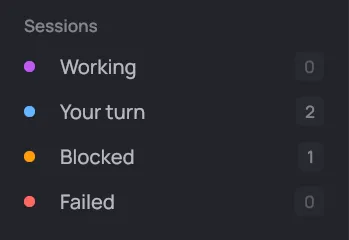
| Status | What it means |
|---|---|
| working | Claude is on a turn, or a background task it started is still running. |
| your turn | Claude answered and waits for you: a reply, a question, or a permission to give. A stopped turn lands here too. |
| blocked | Claude can’t go on and says why (“Blocked by agent: waiting for PR #609”), or it needed a permission it didn’t get. The card moves to Blocked. |
| failed | The session hit an error, or Claude exited mid-turn. The card’s line shows the error. |
| done | Claude says the work is finished. The card moves to Done. |
A card with no session yet, or nothing going on, has no status. You get a desktop notification when a card turns to your turn, blocked, failed or done, unless you’re looking at it.
A card’s links are its pull requests (GitHub, Bitbucket), merge requests (GitLab), issues (GitHub, Jira) and commits. desk shows each one’s live state on the card (“PR #609 · approved — merge”, “ABC-1317 · In Review”), and an open PR’s CI. Their state refreshes every 3 minutes, through the organization’s own accounts. A link whose organization has no account for it says no GitHub account (or GitLab, Bitbucket) and is never fetched.
Claude adds links itself when it opens a PR, and tickets follow their card: moving a card to another column moves the tickets you’re assigned to match.
The infra workspace and the infra Claude
Section titled “The infra workspace and the infra Claude”An organization with a servers file (<Org>/.desk/ssh_config, a plain OpenSSH config) gets a Servers view: its infra workspace. It holds live SSH panes of the organization’s servers, and an infra Claude beside them that runs commands in those panes. It asks you before every change: approve, always, edit or deny.
A card’s Claude doesn’t SSH into servers itself. It hands server work to the infra Claude with desk peer, and the card shows ⇄ <org> infra. Each card gets an infra session of its own (a tab named <org> · DESK-12, with its own Claude), so two tickets’ server work never mixes. The infra Claude’s questions and results come back into the card’s conversation. It can also write to a card unasked, or put follow-up work in To do.
Claude Code sessions outside desk can do the same through desk’s bundled plugin.
Glossary
Section titled “Glossary”| Term | Meaning |
|---|---|
| Card | One piece of work, and the Claude Code session doing it. |
| Key | A card’s id, DESK-12. |
| Organization | A folder of work, with its own accounts, Claude profile and servers. |
| Search folder | A folder desk looks in for organizations, to a depth. |
desk.toml |
An organization’s settings file, in its folder’s .desk/. |
| Claude profile | A Claude Code login of its own for one organization, in ~/Secure/Claudes/<Org>/. |
| Improve with Claude | The new-card dialog’s optional step: Haiku turns your request into a full brief. |
| Status | Where a card’s session stands: working, your turn, blocked, failed, done. |
| Link | A PR, MR, issue or commit attached to a card, with its live state. |
| Account | A GitHub, GitLab, Bitbucket, Jira or Nagios login in an organization’s desk.toml. |
| Vault | A Bitwarden, Vaultwarden or Passbolt account the tokens come from. |
| Servers file | An organization’s OpenSSH config listing its servers. |
| Infra workspace | An organization’s SSH panes and infra Claude, under Servers. |
| Infra Claude | The Claude that works on the servers, asking before every change. |
| Peer | A card’s Claude talking to the infra Claude through desk peer. |
| Demo | desk demo: a made-up board to try desk with nothing set up. |