
Accounts
An organization’s accounts are what its cards’ links, its tickets, its CI and its alerts go
through. They live in the organization’s desk.toml, and you can edit them in
Settings or by hand. An organization can have any
number of each kind.
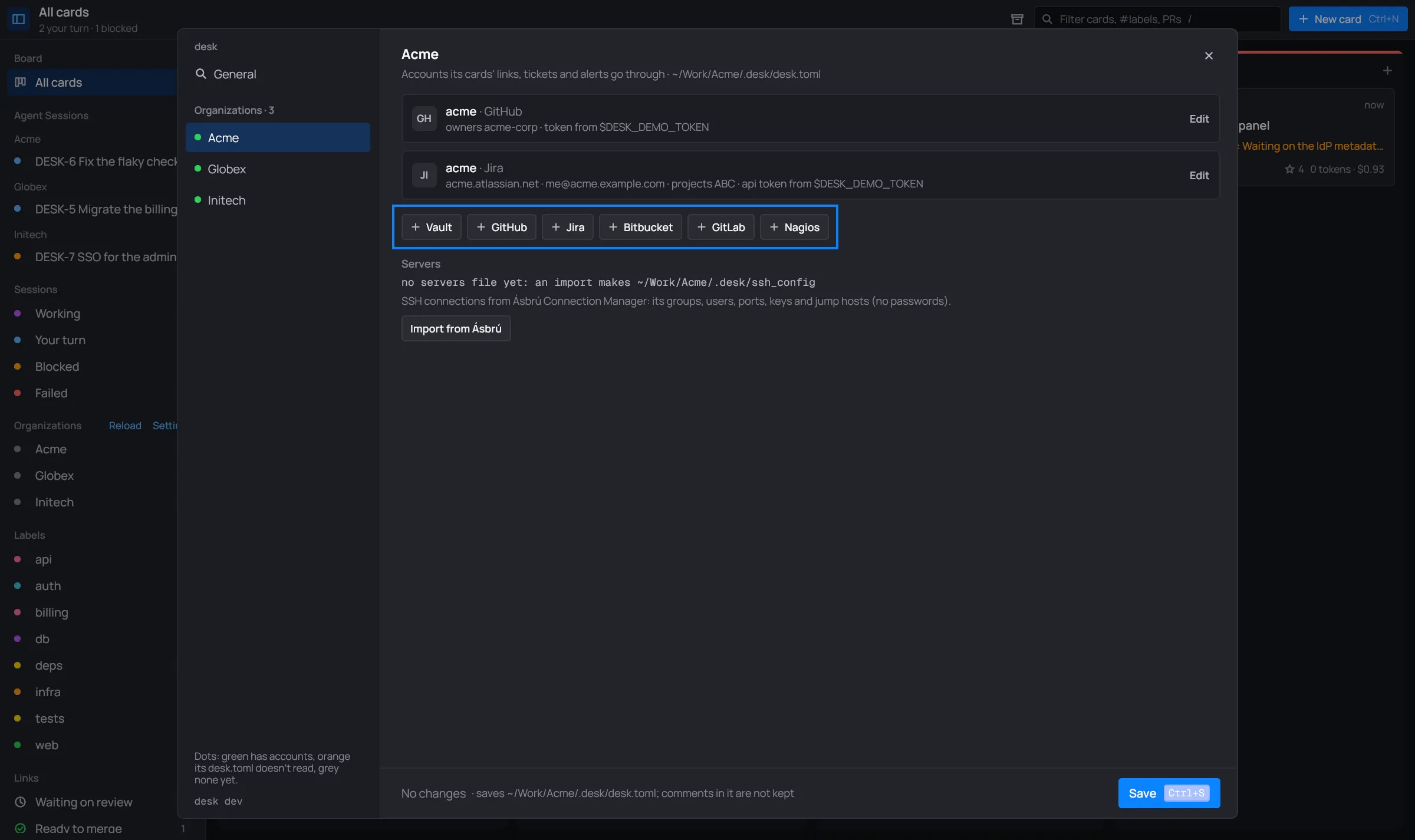
Adding one in Settings
Section titled “Adding one in Settings”- Open Settings and pick the organization in the nav.
- Click + GitHub (or Jira, Bitbucket, GitLab, Nagios). A new card opens with its fields.
- Fill them in, and pick where its token comes from (below).
- Save (Ctrl+S).
desk rechecks the organization’s links and tickets right after saving.
The kinds
Section titled “The kinds”| Field | Key | |
|---|---|---|
| Name | name |
optional |
| Host | host |
github.com (the default), or your Enterprise host |
| Owners | owners |
the users or organizations it answers for; empty: all |
| Token | see Tokens |
Two more keys are only in the file: repo = "owner/name", where cards create their issues when
the organization has no Jira, and sync = false, so cards’ column moves don’t close or reopen
its issues.
[[github]]name = "globex"owners = ["globex-org"]# repo = "globex-org/api"token_env = "GITHUB_GLOBEX_TOKEN"| Field | Key | |
|---|---|---|
| Name | name |
optional |
| URL | url |
https://you.atlassian.net |
email |
the account the API token belongs to | |
| Projects | projects |
keys like ABC: bare keys like ABC-12 link here, and cards create their tickets in the first |
| API token | see Tokens |
Only in the file: issue_type (what new tickets are created as; default Task), sync = false
(column moves don’t transition its issues), ignore (statuses sync leaves an issue in) and a
[jira.status] table naming the status a column moves issues to.
[[jira]]url = "https://globex.atlassian.net"email = "me@globex.example.com"projects = ["ABC"]token_env = "JIRA_GLOBEX_TOKEN"| Field | Key | |
|---|---|---|
| Name | name |
optional |
| Workspace | workspace |
empty: all |
| User | user |
with an app password; empty: the token is a bearer token |
| Token | see Tokens |
[[bitbucket]]workspace = "team"user = "me"token_cmd = "pass bitbucket/team"| Field | Key | |
|---|---|---|
| Name | name |
optional |
| URL | url |
https://gitlab.com (the default), or your server |
| Groups | groups |
empty: all |
| Token | see Tokens |
[[gitlab]]url = "https://gitlab.com"groups = ["globex"]token_env = "GITLAB_TOKEN"| Field | Key | |
|---|---|---|
| Name | name |
what its alerts say they come from, e.g. prod (default: its host) |
| URL | url |
its web root, where cgi-bin/ is: https://mon.example.com/nagios |
| User | user |
the CGIs’ login; empty: none |
| Password | see Tokens | the login’s password |
Each [[nagios]] adds its alerts to the organization’s Alerts view.
[[nagios]]name = "prod"url = "https://mon.globex.example.com/nagios"user = "me"vault = "globex"item = "Nagios prod"The desk.toml reference has every key.
Tokens
Section titled “Tokens”Every account’s token (Nagios: its password) comes from one of these. In Settings, pick it on the account’s card:

| Source | Keys | |
|---|---|---|
| Vault item | vault, item, field |
an item of one of the organization’s vaults, by name or id; field is password (the default), username, notes, totp or a custom field |
| Environment variable | token_env |
the variable’s name; desk says so when it isn’t set |
| Command | token_cmd |
a command that prints it (run with sh -c, at most 20 seconds) |
| In desk.toml | token |
the value itself, in plain text |
| None | no token: desk asks this provider nothing |
[[github]]owners = ["globex-org"]vault = "globex" # a [[vault]] of this organizationitem = "GitHub token"# or: token_env = "GITHUB_TOKEN"# or: token_cmd = "pass github/globex"# or: token = "…"Which account a link uses
Section titled “Which account a link uses”A link goes through the organization’s account that matches it: for GitHub, the host and the repository’s owner (an account with no owners answers for all); for GitLab and Bitbucket, the group or workspace. Links refresh every 3 minutes, and so do the tickets, CI and alerts.
“no GitHub account”
Section titled ““no GitHub account””desk only asks a provider through an account with a token. A link whose organization has no matching account, or whose token comes out empty, is never fetched: its chip says no GitHub account (or GitLab, Bitbucket), its CI stays out of the CI view, and moving its card doesn’t move the ticket.
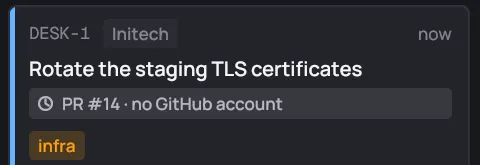
This is on purpose: anonymous API calls see no private repositories and run out fast (GitHub allows 60 an hour per address). To fix it, add an account for that owner, or add the owner to an account’s Owners.
A link whose token is in a locked vault says locked: unlock <vault> until you unlock it: see Vaults.