
The infra Claude
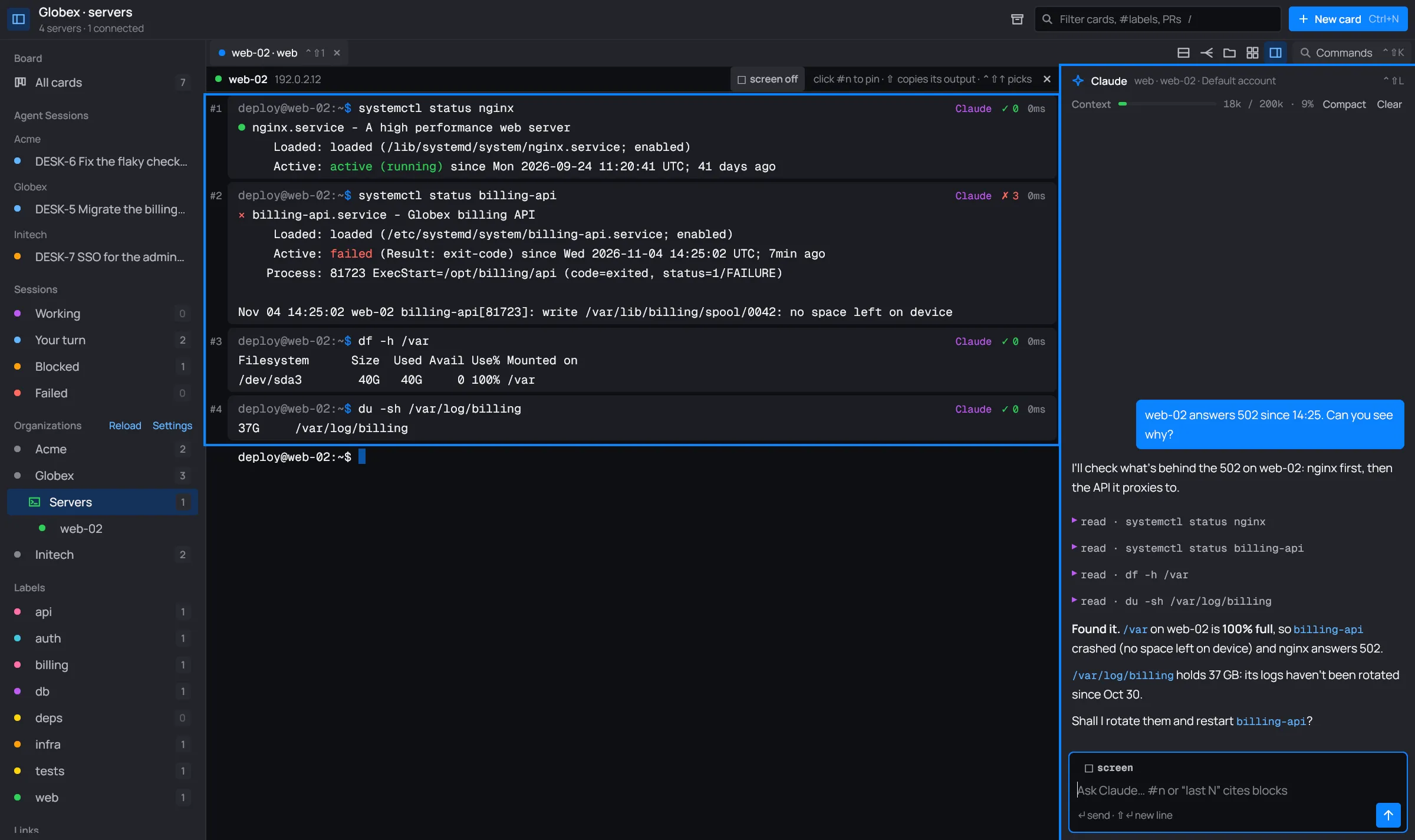
Every tab of the infra workspace has its own Claude, the infra Claude. It sees the commands you point it at, runs its own in the same panes you watch, and asks before anything that changes a server.
Asking it something
Section titled “Asking it something”Type in the composer at the bottom of the Claude panel (Ctrl+Shift+L gets you there) and press ↵. ⇧↵ starts a new line.

- Write
#3or “the last 2” to send those command blocks with your question. Pinned blocks show as chips; a click unpins one. - The □ screen chip sends a snapshot of the screen too.
- While Claude works, the send button becomes a stop button. ↵ still queues your next question.
- Compact and Clear, next to the Context meter in the panel’s header, shorten or empty Claude’s conversation. The palette has them too.
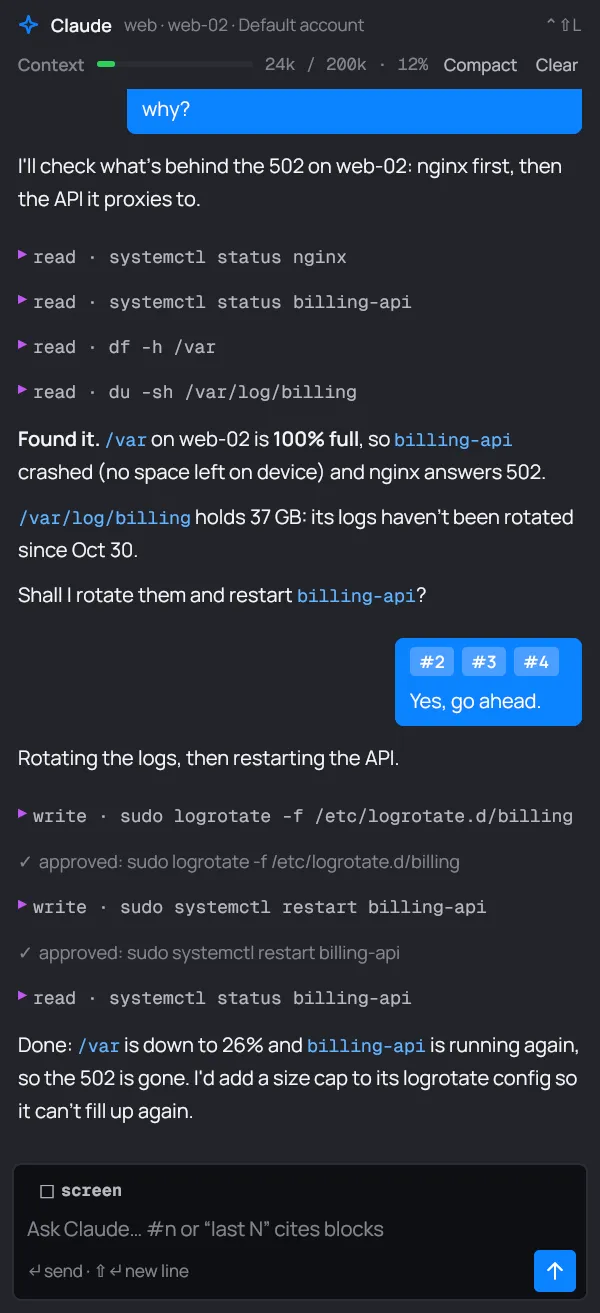
Each command it runs shows in the conversation as a line with its effect (read or write) and
the command, and as a block in the pane, marked Claude.
What it can do
Section titled “What it can do”The infra Claude has no tools of its own (no Bash, no file editing). Everything goes through desk’s tools, in your panes:
| Tool | What it does |
|---|---|
run |
Runs a command in a pane and reads its output and exit code. Up to 300 seconds. |
send_keys |
Sends keys to a running program (<enter>, <ctrl-c>, <f1>…), not at an idle prompt. |
screen |
Reads what a pane shows now. |
connect |
Opens a pane on a server of the organization and waits for its shell. |
split |
Opens another pane on the same server. |
close_pane |
Closes a pane it opened. Yours stay. |
hosts |
Lists the organization’s servers, with their desc and tags. |
changes |
What changed on a server in the last hours: packages, /etc, services, logins, reboots, containers. Read-only. |
note |
Saves a fact about a server for next time. See Notes. |
save_runbook |
Saves a procedure as a runbook. |
ask_peer, task_done, message_card, create_card |
Talk to the cards that hand it work. See Cards and servers. |
nagios |
The organization’s Nagios: hosts, services, alerts. Only with a [[nagios]]. |
metrics |
PromQL queries on the organization’s Prometheus or VictoriaMetrics. Only with a [[metrics]]. |
secrets_search, secret_get |
Find and read an item in the organization’s vault. Only with a [[vault]]; reading always asks you. |
What it sends back to Claude is masked for secrets, except a secret you let it read.
A few rules it follows (they’re in its instructions):
- It labels every command honestly:
readorwrite. - Before a change of several steps it posts a checklist and waits for your go, and it checks the result after each change.
- A command that chains others (
|,;,&&,$(…)) needs a step-by-step explanation, or desk refuses it. - A command it wants you to run goes in a code block in its answer. Type at prompt (Ctrl+Shift+Y) puts it at your prompt without running it; Copy copies it.
Approvals
Section titled “Approvals”desk asks you before every command that isn’t a plain read:
- Claude marked it
write(or didn’t say). - Claude marked it
read, but it looks like a change:rm,mv,systemctl restart,apt install,docker run,kubectl apply,git pushand the like, or a redirect into a file. - Claude Code’s own permission classifier blocked it. desk runs it once you approve and gives Claude the result.
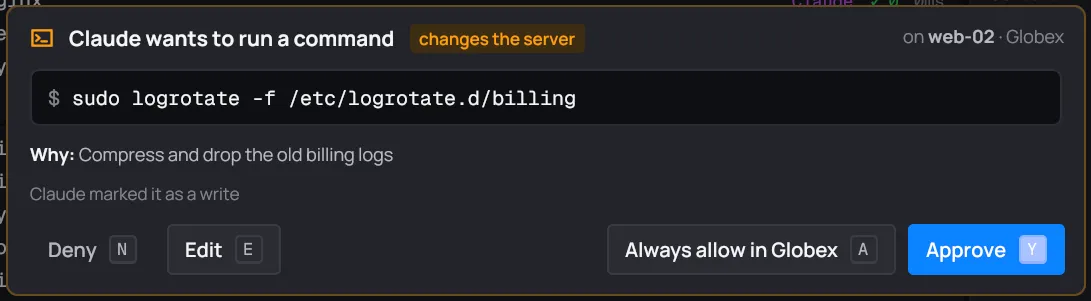
The sheet shows the command, the server and organization, Claude’s reason (“Why: …”), and why desk is asking. A command that chains others also lists what each part does, step by step.
| Button | Key | What it does |
|---|---|---|
| Approve | Y or Enter | Runs it, this once. |
| Always allow in Org | A | Runs it, and runs this exact command unasked from now on, in every tab of the organization. |
| Edit | E | Lets you change the command first. Enter runs your version; Claude is told you edited it. |
| Deny | N or Esc | Doesn’t run it. Claude is told not to retry. |
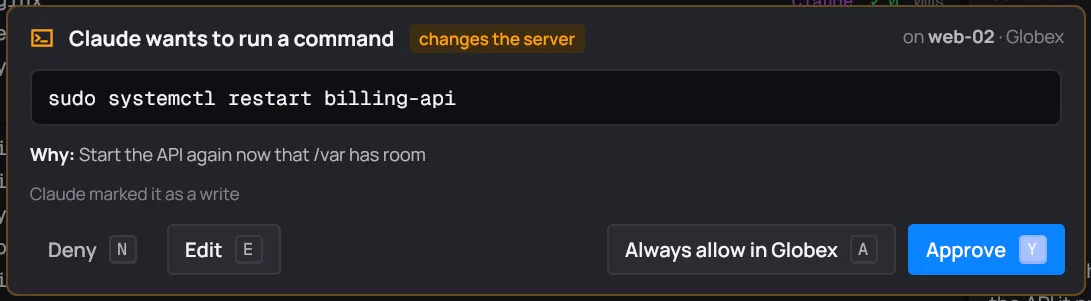
The conversation keeps a line for each answer: “✓ approved: …”, “✓ always allowed (this org): …” or “✗ denied: …”.
While an approval waits, the tab’s dot and the server’s dot in the sidebar turn orange, and if you aren’t looking at desk you get a desktop notification (“Approval needed”).
Keys (send_keys) are asked the same way (“Claude wants to press keys”), and so is reading a
secret (“Claude wants to read a secret”: only Deny and Approve there).
[approvals] in desk.toml
Section titled “[approvals] in desk.toml”For commands you never want to be asked about, or always want to be asked about, list patterns
in the organization’s desk.toml:
[approvals]allow = ["systemctl status *", "journalctl -u *"] # never askdeny = ["reboot*", "* --force*"] # always ask, even if marked read*matches any text. A pattern must match the whole command line.denywins overallow, over Always, and over areadlabel.allowonly applies to a single command: one that chains others always goes by the rules above.
Its folder
Section titled “Its folder”Every tab of an organization with a servers file runs its Claude
in <Org>/.desk/infra/, for example ~/Work/Globex/.desk/infra/. An <Org>/Infra-Claude/
from an older desk moves there by itself the first time.
CLAUDE.mdthere is read by Claude Code as usual: put what every infra Claude of the organization should know (who owns what, maintenance windows, what never to touch).runbooks/holds the organization’s runbooks.
Runbooks
Section titled “Runbooks”A runbook is a Markdown file in <Org>/.desk/infra/runbooks/: a procedure Claude follows step
by step.
# Rotate the billing logs
When /var fills up on a web server.
1. See how full it is: ```sh df -h /var ```2. Rotate: ```sh sudo logrotate -f /etc/logrotate.d/{{service|billing}} ```- The first
#heading is its title (else the file name). {{name}}is a parameter Claude asks you for;{{name|default}}has a default.- Run one from the palette: Claude follows it, asks for
missing parameters, runs each
shstep (writes still wait for you) and stops if a step fails. - Claude can write one with
save_runbookwhen you ask it to keep a procedure. It never overwrites a file: a second “rotate-billing-logs” becomesrotate-billing-logs-2.md.
Claude keeps notes about each server with its note tool: one fact per note, dated. They’re in
~/.local/state/desk/infra/notes/<Org>/<server>.md, a line each (- 2026-11-04 /var/log/billing grows ~5 GB a week), and you can edit them.
The first time a server comes up in a conversation, Claude gets its notes (the newest 6,000 characters). Open server notes in the palette opens the folder.
The audit log
Section titled “The audit log”desk writes down every command run in any pane, yours and Claude’s, and every approval answer.
One JSON line each, in ~/.local/state/desk/infra/audit/<Org>/<YYYY-MM-DD>.jsonl:
{"time":"2026-11-04T14:33:02Z","org":"Globex","group":"web","host":"web-02","event":"approval","by":"you","cmd":"sudo logrotate -f /etc/logrotate.d/billing","verdict":"approved"}eventiscommandorapproval;byisyouorclaude.- Commands have
exit,dur_msand the last 20 lines ofoutput, secrets masked. - Approvals have a
verdict:approved,always,denied, orstopped(you stopped the turn while it waited).
Open audit log in the palette opens the folder. desk has no viewer of its own: use jq or
any JSON-lines tool.
Reports
Section titled “Reports”export session report in the palette writes the tab’s session as Markdown and opens it:
~/.local/state/desk/infra/reports/<Org>-YYYY-MM-DD-HHMM.md, with “Session report”, the
conversation, then “Commands and approvals” from the audit log since the tab opened. Secrets
are masked.
draft a postmortem with Claude first asks Claude for a postmortem of the session (summary, impact, timeline, root cause, fix, follow-ups), so the report you export then carries it.
The daily health check
Section titled “The daily health check”Give an organization a time and its infra Claude checks its systems once a day:
[schedule]health = "08:30"- It runs at that time, or as soon as desk runs after it, once a day.
- It runs in the organization’s own Claude tab (opened in the background if needed), which shows “☀ daily health check”.
- Claude uses read-only tools only: monitoring and metrics first, then the servers, and reports the worst first.
- When it’s done you get a desktop notification, “Daily check ready · Globex”.
The value is a time of day, HH:MM. Anything else is ignored.
Metrics and Nagios
Section titled “Metrics and Nagios”With a [[metrics]] table, the infra Claude can query the organization’s Prometheus or
VictoriaMetrics with its metrics tool:
[[metrics]]name = "prometheus"type = "victoriametrics" # or "prometheus"url = "https://vm.example.com/"token_env = "VM_TOKEN" # or user + a vault item, token, token_cmdtypeisprometheusorvictoriametrics. Withuser, it uses basic auth; otherwise the secret is a bearer token.insecure_tls = trueskips certificate checks.- The secret comes from the same keys as the organization’s accounts:
vault+item(+field),token,token_envortoken_cmd. See Vaults. - desk itself doesn’t draw metrics: they’re for Claude.
With a [[nagios]] table, Claude gets the nagios tool, and with alerts = true desk polls it
every minute: new problems notify you, color the server’s dot red, and show as
investigate … items in the palette. See Alerts.
Model and account
Section titled “Model and account”- The infra Claude runs
claudeunder the organization’s Claude account, like the cards’ sessions: its own profile when the organization has one. - It uses Claude Code’s default model. model: opus, model: sonnet, model: haiku and model: default in the palette change it for the tab, from the next question.