
Claude in drawings
Every Claude desk runs can read the organization’s drawings, and draw in them when you ask. Each drawing also has a Claude of its own, in a chat beside the canvas.
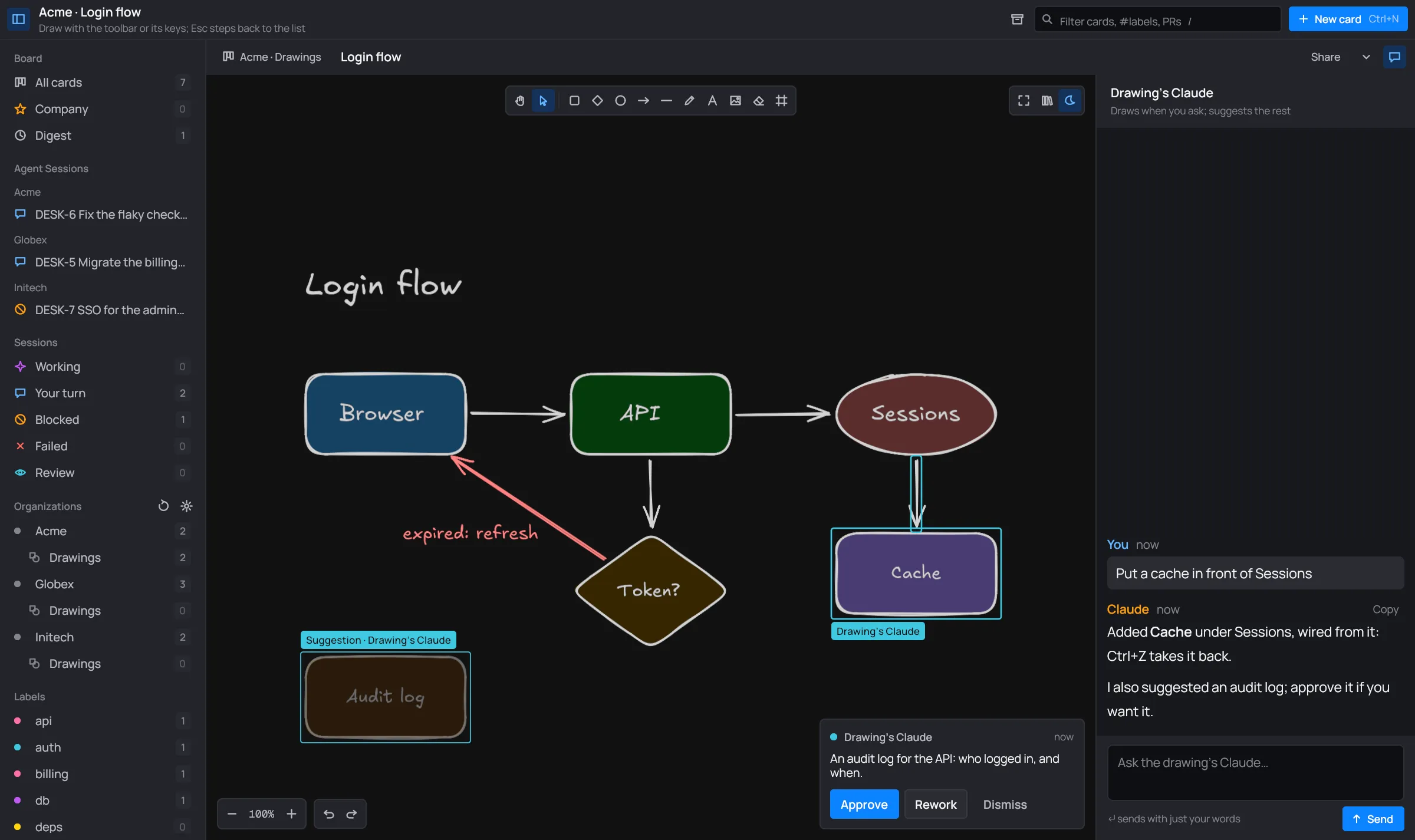
The drawing’s Claude
Section titled “The drawing’s Claude”The chat button at the right of the drawing’s header shows or hides it. Ask it to draw or change something: what you have selected goes with your message, so “make these blue” works. Enter sends, Shift+Enter or Alt+Enter is a new line.
It runs with the organization’s account, in its folder, so it can read the organization’s files to draw from them. A card’s drawing’s Claude runs in the card’s folder instead, with the projects of the card’s workspace, and reads only there unless you ask it to look elsewhere. It draws only through the drawing tools: it never changes a file or runs a command. A card’s drawing’s Claude knows which card the drawing belongs to. It is not the card’s session, though; the card’s own Claude can draw too.
A label wraps to its shape’s width, as in Excalidraw, and the shape grows taller to hold it. Arrows and lines a Claude draws with bends get sharp corners, unless it asks for round ones.
Its conversation is kept with the drawing and picks up where it left off, across restarts.
Claude’s edits
Section titled “Claude’s edits”When a Claude draws in a drawing you have open, you see it happen. What it drew is outlined in its color, with its name under it, until you next press on the canvas. Each of its edits is one step: Ctrl+Z takes it back. A drawing that isn’t open is changed in its file.
Claude draws only when you ask it to. What it thinks would help but you didn’t ask for comes as a suggestion.
Suggestions
Section titled “Suggestions”A suggestion floats over the drawing in its Claude’s color: what it would add, see-through; what it would change, as it would look; what it would delete, crossed out. Its card at the bottom right says who suggested it and why:
- Approve makes the change, as one step you can undo.
- Rework opens a box for your comment, which goes back to that Claude. Its next suggestion replaces this one. The infra Claude’s suggestions have no Rework: there is no conversation to send it to.
- Dismiss drops it.
Each Claude has at most one suggestion waiting on a drawing: a new one replaces its last. Suggestions are kept beside the drawing, never in its file, so they don’t reach excalidraw.com. With Desk Control on, a suggestion also comes to Telegram as a picture with Approve, Rework and Dismiss.
The drawing tools
Section titled “The drawing tools”Every Claude gets these tools from desk:
| Tool | What it does |
|---|---|
drawings |
Lists the drawings it can read: the organization’s and, for a card’s Claude, the card’s own. |
drawing_read |
A drawing as a picture, and its elements one a line: id, type, place and size, colors, label, frame, groups, and what an arrow joins. Your unsaved changes are in it. |
drawing_edit |
Adds, changes and deletes elements, as one step you can undo. A name not taken makes a new drawing (in the card’s own drawings, for a card’s Claude). |
drawing_suggest |
Proposes a change instead, with a note, for you to approve. |
Who gets which:
| Claude | Tools |
|---|---|
| A drawing’s own | all four; its own drawing unless it names another |
| A card’s session | all four |
| A card’s workspace Claude | drawings, drawing_read and drawing_suggest: it only reads |
| The infra Claude | all four |