
Review & ship
With worktrees on, each new card works on its own branch, in its own copy of the repository, so several cards can change the same repository at once without stepping on each other or on your checkout. When the card is done, its Review shows what the branch changed and ships it.
Turning it on
Section titled “Turning it on”Worktrees are per organization, off by default. In Settings, open
the organization’s Git & review page and turn on Each card on its own worktree, or add to
its desk.toml:
[git]worktrees = trueFrom then on, a new card whose folder is inside a git repository gets, before its Claude’s first turn:
- a branch named after the card,
desk-12, off the repository’s default branch (origin’s, after a fetch; the local one when there’s no origin or the fetch fails); - a worktree for it at
<repo>/.worktrees/desk-12, kept out ofgit statusthrough the repository’sinfo/exclude.
Its Claude, its terminal, its ! commands and its workspace then all work in the worktree (the
same subfolder, when the card’s folder is one). The card’s note says “Making its worktree…”
while git works, and a toast names the branch. Cards that already had a session keep working where
they were, and so does a card whose folder isn’t in a repository. When git fails, the card works
in its folder and a toast says why.
The Review
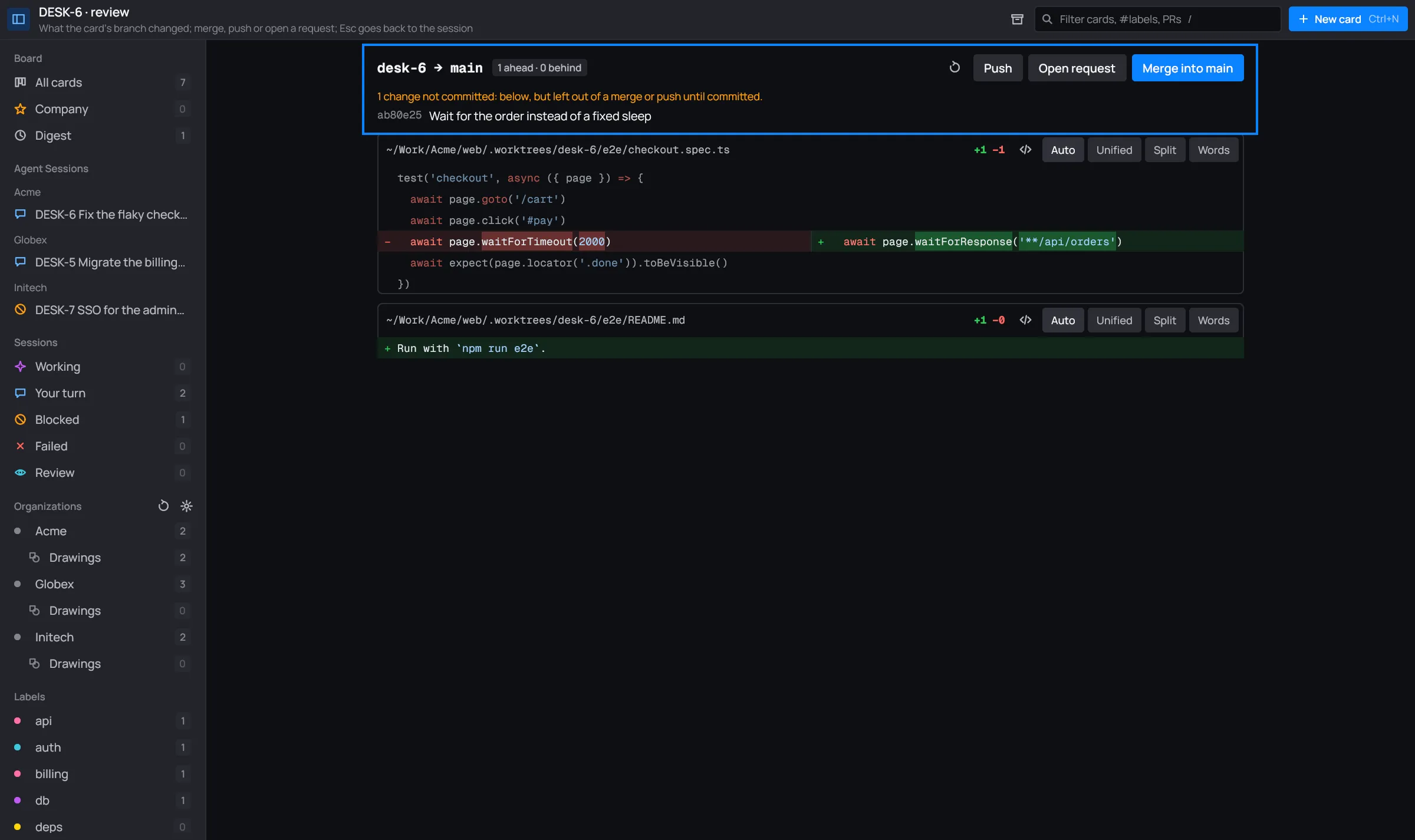
Section titled “The Review”A card with its own branch has a Review button (an eye) in its session’s header. The Review fills the window:
- the branch and its base, with how many commits it is ahead and behind;
- its commits, newest first;
- each file it changed, as a diff against where the branch left its base, changes not committed and new files included (binary files are named, not shown). Each diff has the same views as the conversation’s (Auto, Unified, Split, Words) and opens in the workspace.
The reload button reads the branch again. Esc goes back to the session.
Shipping
Section titled “Shipping”| Button | What it does |
|---|---|
| Push | pushes the branch to origin, setting it as its upstream |
| Open request | pushes, then opens a pull request (GitHub) or merge request (GitLab) from the branch into its base, through the organization’s account for that repository, titled after the card with its notes as the description. The request becomes a link on the card, with its state and CI |
| Merge into main | fast-forwards the base branch to the card’s branch, in the repository’s main checkout. It asks for a second click first. The card then goes to Done |

Merge never makes a merge commit. It refuses, with git’s reason, when the main checkout isn’t on the base branch, has changes not committed, or the base moved on since the branch left it: ask the card’s Claude to rebase its branch, then merge again. Changes not committed in the worktree are shown, but stay out of a push or merge until they’re committed.
Push and merge use your own git and its credentials. Nothing is pushed on its own: pushing the base branch after a merge is yours to do.
When the card is archived
Section titled “When the card is archived”Archiving the card removes its worktree, and its branch when that is merged. A worktree with changes not committed stays, and a toast says where; an unmerged branch always stays.