Your phone
When you’re away from desk, a card that waits on you can wait a long time: a permission request, a question, the end of its turn. With a Telegram bot, desk sends those to your phone, and you answer there.
desk talks to Telegram by asking it for news (long polling), so nothing on your machine is opened to the internet. It stops when desk quits.
Setting it up
Section titled “Setting it up”-
In Telegram, talk to @BotFather, send
/newbotand follow it. It gives you the bot’s token,123456:ABC…. Keep it to yourself: whoever has it can talk as the bot. -
Give desk the token, from an environment variable or a command rather than as text when you can. In Settings → Telegram, pick where Bot token comes from (Environment variable, Command or In settings.toml), or write it in
~/.config/desk/settings.toml:[telegram]token_env = "DESK_TELEGRAM_TOKEN" # or token_cmd = "pass show desk/telegram", or token = "…"An older
[phone]table works too: desk moves it to[telegram]the next time it saves its settings.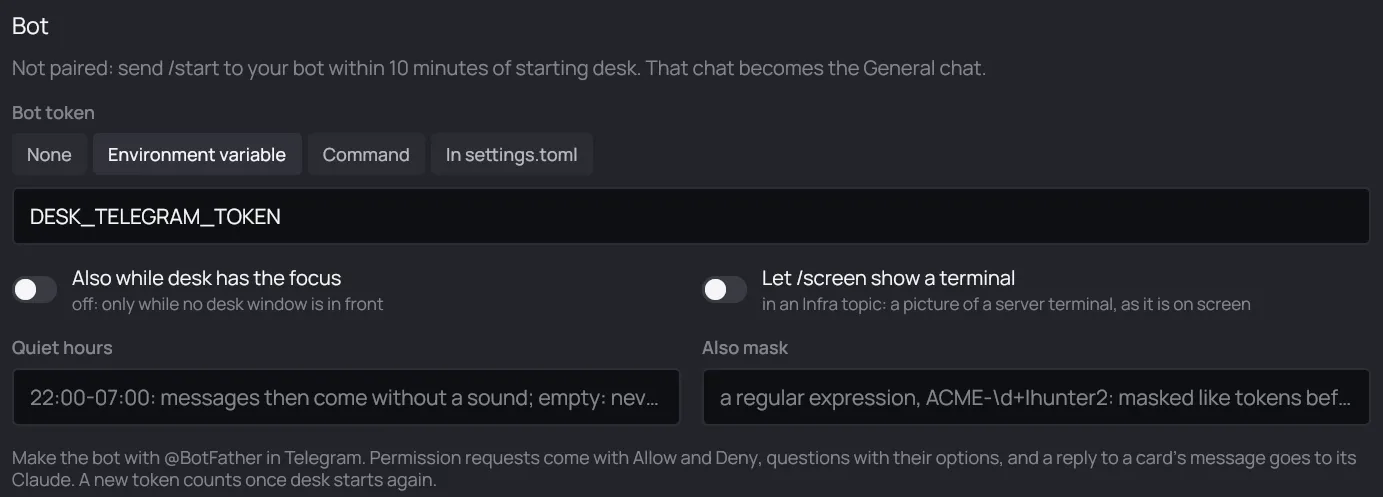
The token set, not paired yet. -
Start desk, open your bot in Telegram and send it
/startwithin 10 minutes. desk pairs that chat, says so in a toast and in the chat, and writes itschat_idintosettings.toml. After that, the bot ignores every other private chat. The Telegram page then says Paired with Telegram chat N: the General chat.
To pair another chat, click Unpair on the Telegram page and Save, then send /start from
that chat within 10 minutes. A new token counts once desk starts again.
The same page sets up Desk Control: your own account makes a chat folder and a forum group per organization, with this bot as their admin (see Settings → Telegram).
What comes to the phone
Section titled “What comes to the phone”The same moments as desk’s desktop notifications: a card turns to your turn, blocked, failed or
ready for review. By default only while no desk window has the focus; Also while desk has the
focus on the Telegram page (always = true under [telegram]) sends them while you’re at desk
too.
| On the phone | What you can do |
|---|---|
| A permission request (“Wants to run Bash: …”) | Allow or Deny. It’s answered as desk’s own Allow once and Deny are; a press on a request already answered says so |
| A question | its options as buttons when it’s a single question with one answer; otherwise reply in your own words |
| Its turn, a block, a failure | the card’s last message. Reply to it, and your reply goes to the card’s Claude as your next message |
Each message starts with the card’s key and title. A message that isn’t a reply to one of the
bot’s goes to desk itself: a command such as /board or /new, or a question for the desk
Claude. See The General chat.