
Autopilot
An autopilot works several of your tickets at once. Every ticket gets a card of its own, and one more card, the autopilot, has a Claude that runs them: it starts them, answers their questions and permission requests, and steers them. It does no work itself. Only what it can’t decide reaches you, and only its card notifies you.
Start one
Section titled “Start one”-
Open an organization’s Tickets view.
-
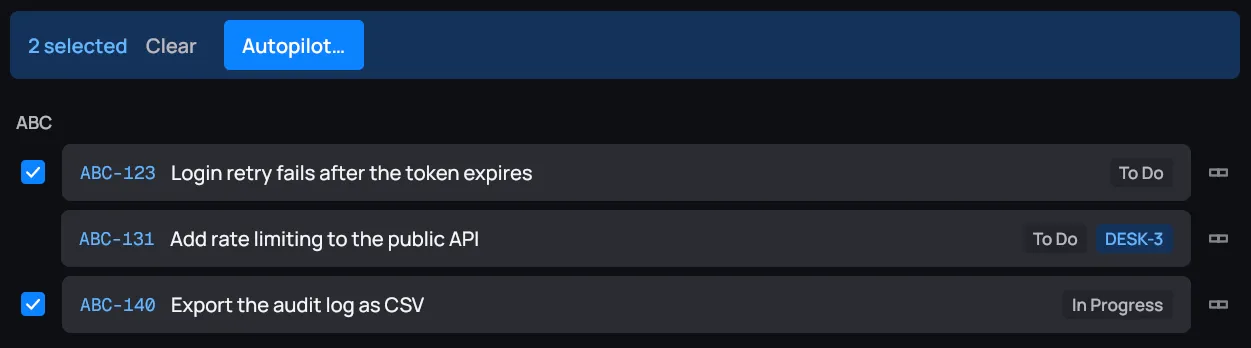
Check the tickets with the box at the left of each row. A ticket that already has a card has no box: it’s being worked on. A bar at the top says how many are checked, with Clear and Autopilot….
-
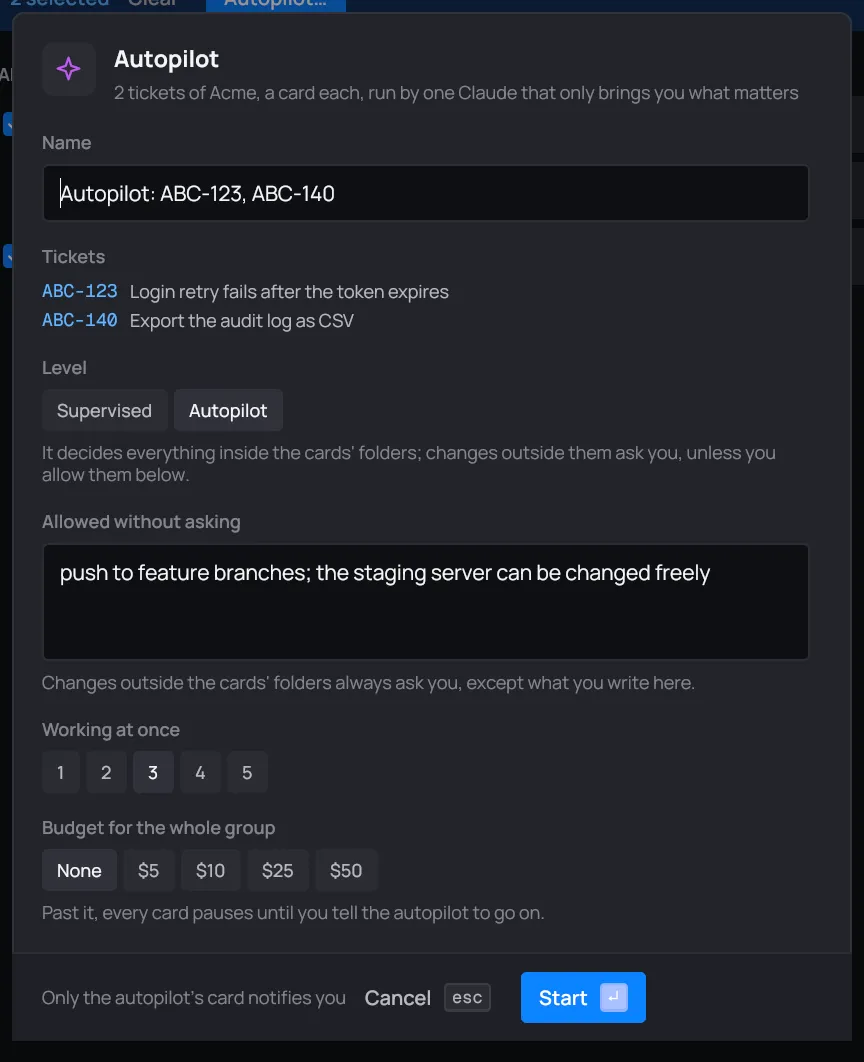
Autopilot… opens the dialog:
- Name: the autopilot card’s title (Autopilot: ABC-1, ABC-2 to begin with).
- Level: what it decides without you (below).
- Allowed without asking: in your own words, what it may change outside the cards’ folders: the staging server can be changed freely, push to feature branches.
- Working at once: how many of its cards work at the same time (3 to begin with).
- Budget for the whole group: None, $5, $10, $25 or $50, what the autopilot and its cards may spend together (below).
-
Start (Enter): the cards are made in To do, a ticket that already has a card keeps it, and the autopilot starts at once. Esc or Cancel closes the dialog.
Levels
Section titled “Levels”| Level | It decides | It asks you |
|---|---|---|
| Supervised | reading, edits inside the cards’ folders, local builds and tests | everything else |
| Autopilot | everything inside the cards’ folders: edits, builds, tests, local commits and branches | anything that changes something outside them: pushing, pull requests, tickets, deploys, servers, sending anything |
What you write under Allowed without asking is the exception: the autopilot may do it without
asking. desk holds it to that for a permission request that looks external (git push, gh,
curl, ssh, kubectl, desk peer, any MCP tool…):
- With nothing written there, the request goes straight to you.
- Otherwise the autopilot may allow it only by quoting the words of yours that allow it. Without a quote that’s in what you wrote, desk sends the request to you instead.
- A request that went to you shows in its card’s chat as asks you to run, and notifies you like any card’s. Answer it there.
desk spots those by the command, not by what it does, so a script that pushes by itself gets past it. The autopilot is still told to leave every outside change to you.
Tickets
Section titled “Tickets”A card’s ticket follows its column, as any card’s does: a card in Review moves its ticket to
review at once. Its Claude can’t move the ticket any other way without asking (ticket_status
asks, and goes through the rules above).
The autopilot and its cards are one piece of work: once its card is in Done (moved by you or by its Claude), its cards go to Done too, whatever state each was in, and their tickets with them.
Budget
Section titled “Budget”With a budget, desk adds up what the autopilot and all its cards cost. Past it:
- the autopilot can’t start more cards;
- each card pauses as its turn ends, as an organization’s budget pauses one;
- what the cards say to the autopilot waits.
Your next message in the autopilot’s chat is the go-ahead: the group gets the budget again from there.
How it runs
Section titled “How it runs”- The autopilot’s Claude starts its cards with a brief each, never more at once than you allowed, and can add a card for work it finds along the way (a card only: no ticket).
- A card’s questions, permission requests and finished turns go to the autopilot, never to you: in the card’s chat they read asks the autopilot, allowed by the autopilot, and its messages come from Autopilot DESK-n.
- When it needs you, the autopilot ends its turn with the question and the card it’s about, and its card turns to you like any other. Answer in its chat. A card’s open request also shows in that card’s own chat, where you can answer it yourself.
- When every card is ready for review, the autopilot’s card goes to Review with what each did.
On the board
Section titled “On the board”The autopilot’s cards don’t show as cards of their own: the autopilot’s card lists them, each with its state, under Autopilot · 1 of 3 ready. Its session’s header lists them too: a click opens one. A card’s own header reads ↑ Run by the autopilot DESK-n, which opens the autopilot. The board’s search finds them too.
In the sidebar’s Agent Sessions its cards are listed right under it, indented (a finished autopilot still heads a card of its own that is open). Its session opens on its canvas, with a node for each of its cards: wired from the autopilot’s session and into Done, a click opens that card’s session. In the Company view its cards sit next to it on the outer ring, each tied to it by a dashed tether.
Archiving the autopilot’s card puts its cards back on the board.